Creating Your First Mod
This guide walks through the current workflow for creating a new mod. The toolkit now scaffolds mods for TypeScript scripting through Puerts, so you should treat TypeScript as the default gameplay scripting path.
Step 1: Create a new mod
- In the Unity Editor, open Vox Mod Tools > New Mod Wizard.
- Enter your Creator Name and Mod Name.
- Click Create Mod.
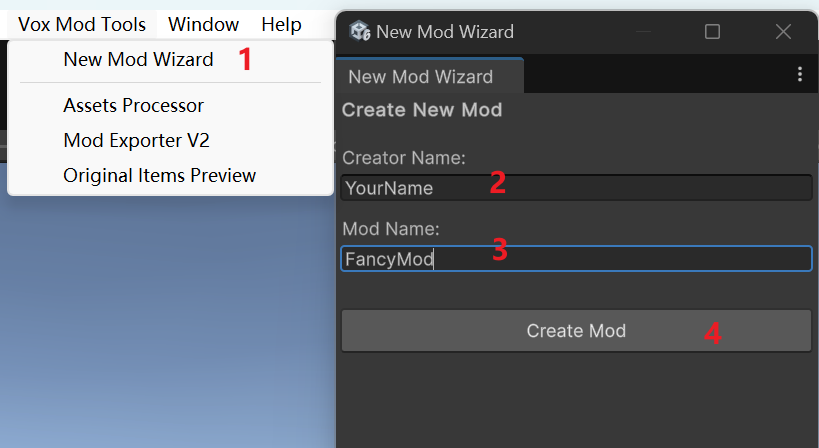
The wizard creates your mod under Assets/Mod/com.<creator>.<modname>.
Step 2: Understand the generated structure
The wizard creates these folders and files for you:
- Root folder: Place
.voxassets and any mod-local files here. Scripts/: TypeScript source files for your gameplay logic.Prefab/: Generated prefabs and prefab variants you want to export.Data/: Extra data files generated by import tools or used by your content.tsconfig.json: Per-mod TypeScript compiler configuration.manifest.asset: Your mod metadata and exporter configuration.
It also creates a starter script pair:
Scripts/index.tsexports your gameplay class.Scripts/<modname>.tscontains a minimalJsComponentProxy-based class.
Step 3: Author scripts in TypeScript
Mods no longer use legacy custom C# scripts as the main authoring workflow. Instead:
- Export your gameplay class from
Scripts/index.ts. - Attach
JsComponentProxyto the prefab that should run the script. - Set the proxy's script/class name to the exported TypeScript class name.
- Use
JsPropertieson the same prefab to pass references into the script when needed.
Minimal pattern:
export class MyModComponent {
private bindTo: VX.Mod.JsComponentProxy;
constructor(bindTo: VX.Mod.JsComponentProxy) {
this.bindTo = bindTo;
this.bindTo.onUpdate = (dt) => this.onUpdate(dt);
}
private onUpdate(deltaTime: number): void {
}
}
Step 4: Configure the manifest
Open manifest.asset in your mod root and fill in the metadata for your mod.
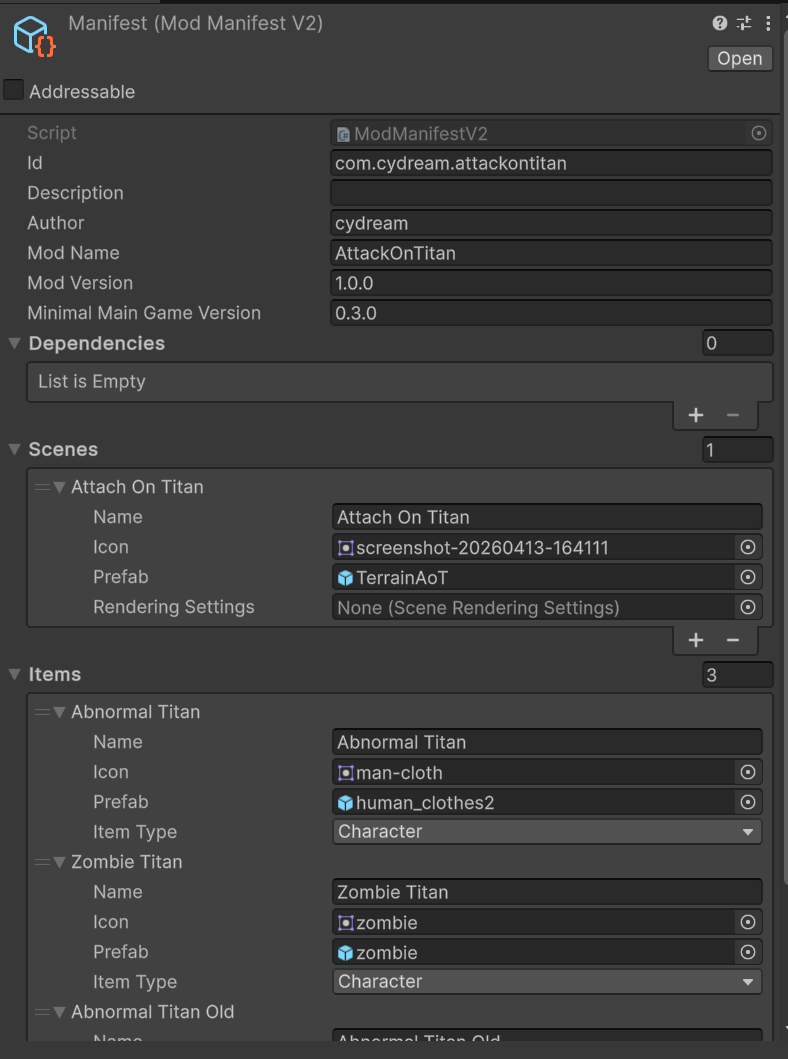
Most importantly:
- Add every prefab you want to ship to Export Prefabs.
- Keep the version fields updated before packaging a release.
Step 5: Build and export
After importing assets and configuring your prefabs:
- Open Vox Mod Tools > Mod Exporter.
- Select your mod.
- Build the target platform.
- Install locally or package the output for mod.io.
The exporter writes builds to the project's Assets/Export pipeline output used by the toolkit.