Tutorial: Helicopter
This tutorial introduces the current Helicopter sample in Assets/Samples/com.cydream.helicopter. The sample uses the normal vehicle prefab pipeline plus a TypeScript logic layer for helicopter-specific flight behavior.
Step 1: Import the voxel model as a vehicle
Import your helicopter .vox file with Vox Assets Processor and set Convert Type to Vehicle before converting.
The sample is organized as separate voxel parts for the helicopter body and rotor, then assembled into a single prefab setup after import.
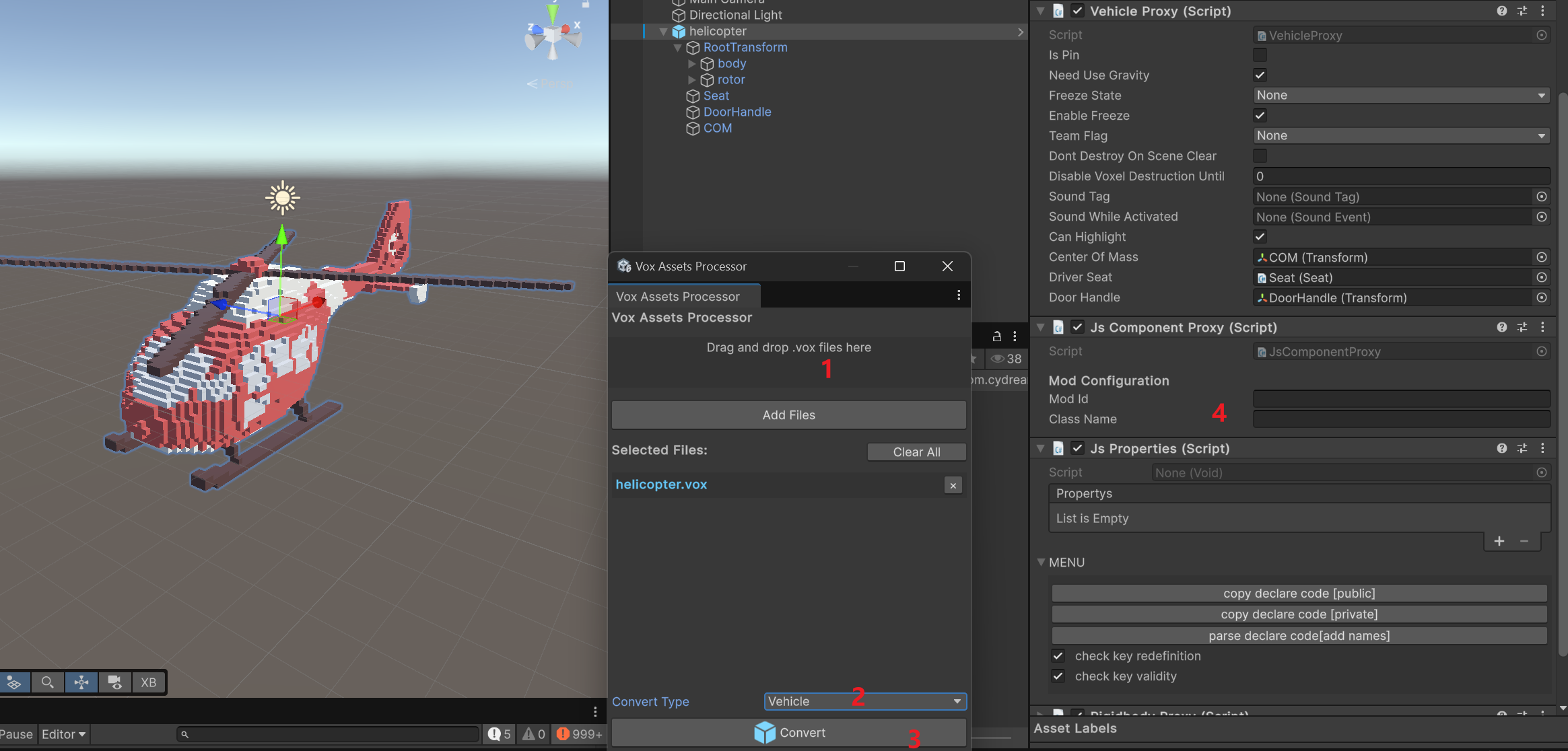
Step 2: Configure the vehicle prefab
After import, use the generated prefab as the base and set up the same core structure used by the sample:
Vehicle Proxyon the root object.Rigidbody Proxyon the root object.JsComponentProxyon the root object.- A
Seatchild transform and seat component for the driver. - A
DoorHandlechild transform linked to the seat. - A
COMchild transform assigned as the vehicle center of mass. - A
RootTransformchild that holds the imported voxel parts.
In the sample prefab, Vehicle Proxy references:
Driver Seat->SeatDoor Handle->DoorHandleCenter Of Mass->COM
Vehicle Proxy is required. It is the component the game uses to inject vehicle logic, receive control input, and connect the prefab to the built-in vehicle systems. Without it, the TypeScript layer cannot hook into the helicopter as a working vehicle.
Add JsComponentProxy on the same root object and set:
Mod Idto your mod idClass NametoHelicopter
The sample also keeps the imported vehicle parts under RootTransform, with a body voxel object and a rotor voxel object.
Step 3: Add custom config for the helicopter
Besides the required seat, handle, and center of mass references, you can add custom config values for helicopter logic.
The sample script looks for a rotateCenter reference in component pair data and uses it as the rotor visual pivot. If that custom reference is not provided, it falls back to RootTransform/rotor.
That means the common setup pattern is:
- Keep
Seat,DoorHandle, andCOMconfigured onVehicle Proxy. - Keep the visible rotor as a separate transform under
RootTransform. - Optionally expose extra references or tuning values through
JsPropertieswhen you want a more customized vehicle setup.
Step 4: Create the logic in TypeScript
The vehicle gameplay logic is implemented in Assets/Samples/com.cydream.helicopter/Scripts/helicopter.ts and exported by Scripts/index.ts.
This script is a good reference for common vehicle logic patterns:
- Find the attached
Vehicle ProxyfromJsComponentProxy. - Read core references such as vehicle transform, rigidbody, center of mass, and rotor transform through
ModAPI. - Register handlers for engine state, throttle, brake, steering, and ability input.
- Apply forces and torques in
onFixedUpdateto simulate lift, pitch, roll, yaw, damping, and hover hold. - Rotate the rotor visually in
onUpdate. - Clear vehicle callbacks in
onDestroy.
Representative setup:
export class Helicopter {
    private readonly bindTo: VX.Mod.JsComponentProxy;

    constructor(bindTo: VX.Mod.JsComponentProxy) {
        this.bindTo = bindTo;

        this.bindTo.onStart = () => this.onStart();
        this.bindTo.onUpdate = (dt) => this.onUpdate(dt);
        this.bindTo.onFixedUpdate = (dt) => this.onFixedUpdate(dt);
        this.bindTo.onDestroy = () => this.onDestroy();
    }
}
The key pattern is that the built-in vehicle component stack stays on the prefab, while TypeScript layers the helicopter flight behavior on top by subscribing to the Vehicle Proxy callbacks and driving the rigidbody through ModAPI.
Step 5: Reference the prefab and export
After the prefab is working, add it to manifest.asset.
In the sample:
idiscom.cydream.helicopter- the exported prefab is
Prefab/helicopter.prefab
Then export the mod and test these points in game:
- The player can enter from the configured
DoorHandle - The driver sits in the correct
Seat - The helicopter balance feels correct with the configured
COM - The rotor spins and the helicopter responds to vehicle input
- The
JsComponentProxyis calling theHelicopterTypeScript logic correctly