Tutorial: SpiderMan
This tutorial covers the current SpiderMan avatar sample in Assets/Samples/com.cydream.spiderman. The active implementation is written in TypeScript and drives the assembled player character through JsComponentProxy, ModAPI, and the runtime EntityCharacter object.
Step 1: Prepare the voxel character in MagicaVoxel
Before importing the .vox file, separate the character into individual limbs and give every part a clear name. The character importer uses those child voxel objects to build the generated character prefab and map them to the skeleton.
Use names that match the body parts you want to assign later, such as:
headchestpelvisarm_upper_larm_lower_lhand_larm_upper_rarm_lower_rhand_rleg_upper_lleg_lower_lfoot_lleg_upper_rleg_lower_rfoot_r
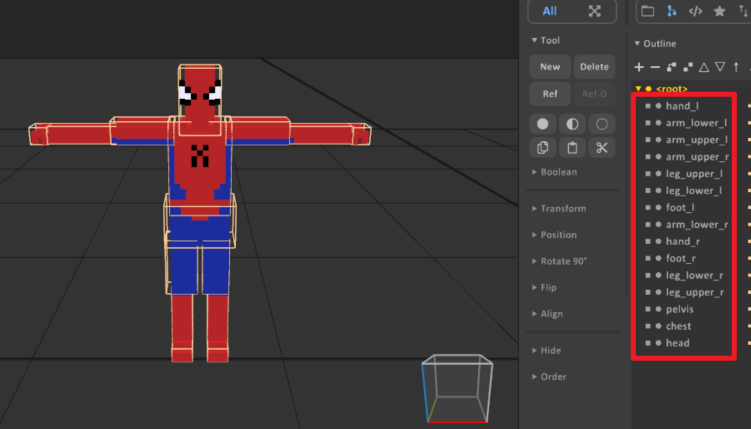
Step 2: Convert the .vox file into a character prefab
Open Vox Assets Processor and follow the import flow:
- Drag the SpiderMan
.voxfile into the processor. - Set Convert Type to Avatar.
- Click Convert.
- The tool creates a GameObject in the scene with the imported voxel parts under the root transform.
After conversion, select the generated GameObject and configure Avatar Proxy:
- Click Auto Assign to map the imported voxel parts to the body slots. Verify that each slot points to the correct voxel limb, and fix any mismatches manually.
- (Optional) Add script hooks for any custom behavior in Avatar Proxy.
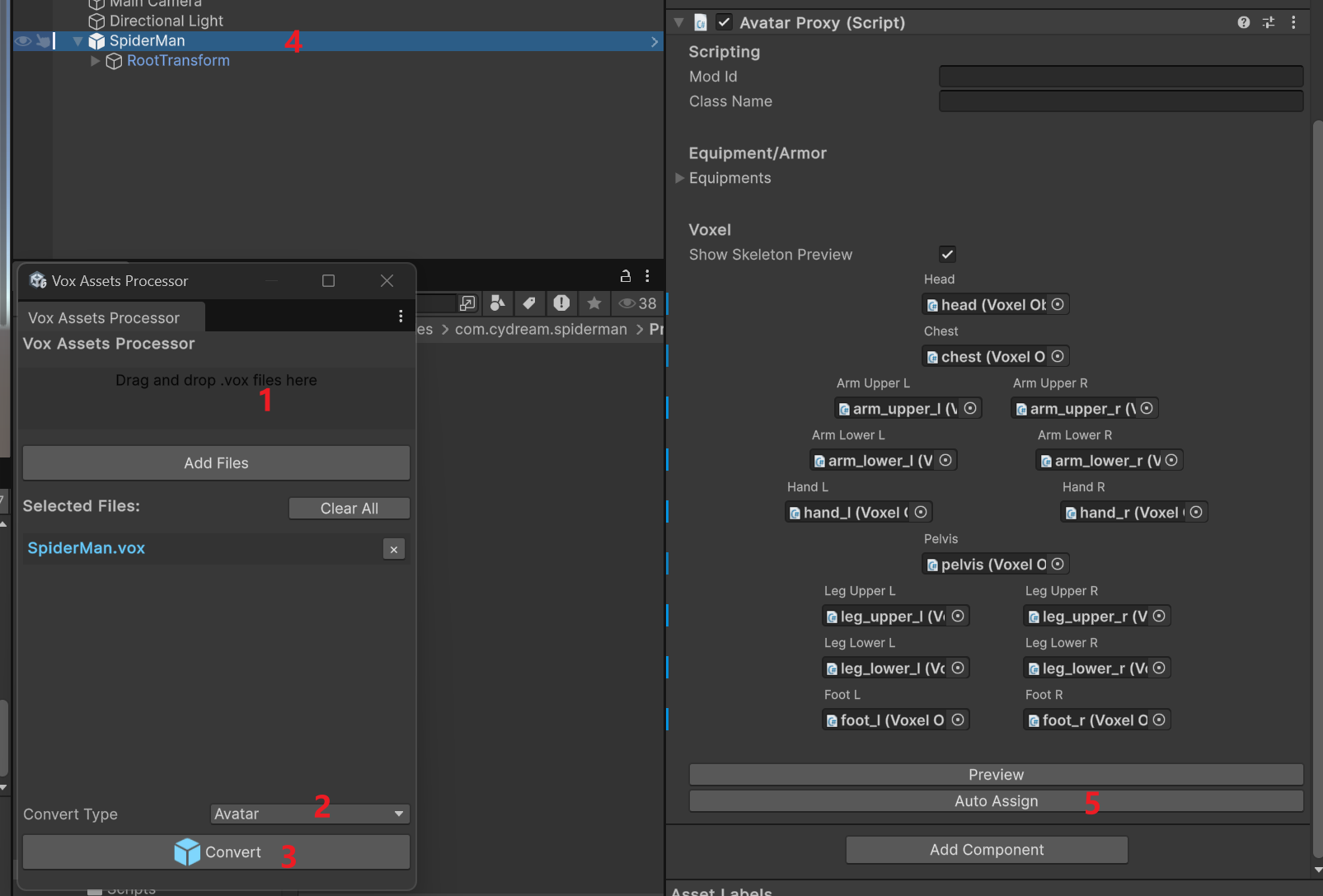
Step 3: Align the voxel limbs to the skeleton
After the voxel parts are assigned, use the scene view to line them up with the generated skeleton before you continue with gameplay logic.
- Select the generated avatar root in the scene.
- Preview the assigned voxel body parts and skeleton together.
- Move and rotate each voxel limb until it matches the target bone position.
- Check the silhouette from the front and side views so the arms, hands, legs, and feet sit naturally on the rig.
This alignment pass is important because the SpiderMan script assumes the runtime avatar is already assembled on a cleanly matched skeleton.
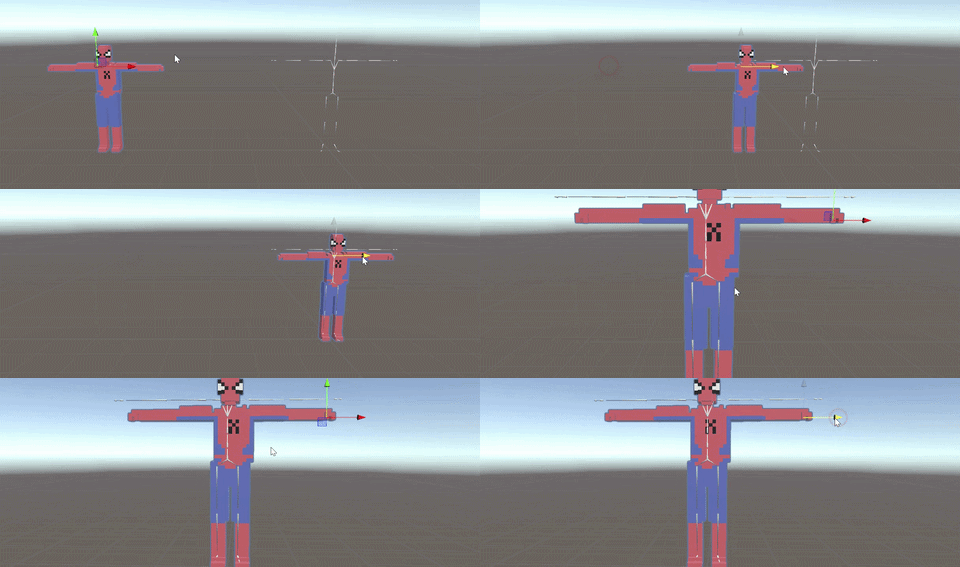
Understanding Runtime Avatar Assembly
When setting up the avatar prefab with AvatarProxy and the required avatar content, note that you do not add EntityCharacter directly to the prefab in the authoring step.
At runtime, the game instantiates another character prefab and assembles the content referenced by AvatarProxy into the actual player character. That assembled runtime object exposes EntityCharacter, which is why the TypeScript script can resolve and use it.
Because the authored objects under the mod's AvatarProxy are not automatically attached to the runtime character's body parts, you must move them manually in your TypeScript script's onStart lifecycle method. Use ModAPI.GetCharacterBody to locate the target body part and re-parent your custom objects.
For example, to attach an authored particle system to the character's hip:
private onStart(): void {
if (this.smokeParticles) {
// Get the runtime character's Hip body part
const hip = ModAPI.GetCharacterBody(ModAPI.ControlledCharacter, "Hip");
if (hip) {
// Re-parent and reset transform
this.smokeParticles.transform.SetParent(hip.transform);
this.smokeParticles.transform.localPosition = Vec3.zero;
this.smokeParticles.transform.localRotation = Quat.identity;
this.smokeParticles.transform.localScale = Vec3.one;
}
}
}
Step 4: Add the TypeScript controller
To enable the grappling behavior:
- Export
SpidermanfromScripts/index.ts. - Setup "ModId" and "ClassName" to
AvatarProxyin the avatar prefab. - Set the proxy class name to
Spiderman. - Keep
AvatarProxyon the prefab as the avatar authoring component. - Add
JsPropertiesentries for any optional sound hooks:moveJetSoundreelRopeSoundhookShotSound
The script resolves EntityCharacter from the assembled runtime player object and then manages the rest of the feature from TypeScript.
Step 5: Understand the behavior model
The sample creates two grappling states, one per hand, and updates them every frame:
- It reads fire and ability input through
ModAPI.Input. - It raycasts or sphere-casts from the controller direction to find grapple targets.
- It attaches joints to the character with mod API helpers.
- It renders the rope with runtime-created
LineRendererobjects. - It applies pull forces, reel-in behavior, and swing assist in
onFixedUpdate.
That means you do not need to author extra MonoBehaviours for rope rendering or joint management. The TypeScript class owns all of it.
Step 6: Controller and rope expectations
The script works best when:
- The game can resolve left and right controller transforms.
- The avatar is assembled correctly from
AvatarProxyinto a runtime player character. - The target objects expose the expected rigidbody or voxel collision data.
If a VR controller transform is not available, the sample falls back to the main camera direction for some calculations, but the intended experience is controller-driven.
Step 7: Key TypeScript pattern
The top-level structure is:
export class Spiderman {
private bindTo: VX.Mod.JsComponentProxy;
private character: VX.Entity.EntityCharacter | null;
constructor(bindTo: VX.Mod.JsComponentProxy) {
this.bindTo = bindTo;
this.character = bindTo.GetComponent(
puerts.$typeof(VX.Entity.EntityCharacter)
) as VX.Entity.EntityCharacter | null;
this.bindTo.onUpdate = (dt) => this.onUpdate(dt);
this.bindTo.onFixedUpdate = (dt) => this.onFixedUpdate(dt);
}
}
In authoring, you configure the avatar through AvatarProxy. In runtime, the script interacts with the assembled EntityCharacter. That is the current pattern for advanced avatar logic in the toolkit.
Step 8: Configure the manifest and test
Add the avatar prefab to manifest.asset, then validate the mod:
npm run lint:mod -- com.cydream.spiderman
Testing checklist:
- Both hands can acquire grapple targets.
- Rope visuals appear and disappear correctly.
- Reeling and ability pull affect the character as expected.
- Continuous rope / movement sounds stop correctly when grapples are released.