Tutorial: FlameSword
This tutorial introduces the current FlameSword sample in Assets/Samples/com.cydream.flamesword. Like the recent katana and asteroid wand samples, the gameplay extension is implemented in TypeScript and attached through JsComponentProxy.
Step 1: Import the voxel sword and create the prefab
Create or import a .vox sword model, then convert it into a prefab with the voxel import tools.
The sample lives in Assets/Samples/com.cydream.flamesword and includes:
flamesword.voxPrefab/flamesword.prefabScripts/flamesword.ts
Use the same import flow as the katana or asteroid wand samples: import the voxel file, generate the prefab, then use that prefab as the base for your weapon setup.
Step 2: Prepare the prefab hierarchy for a blade weapon
The FlameSword sample is a cold weapon, so it uses BladeTrigger instead of firearm-style firing logic.
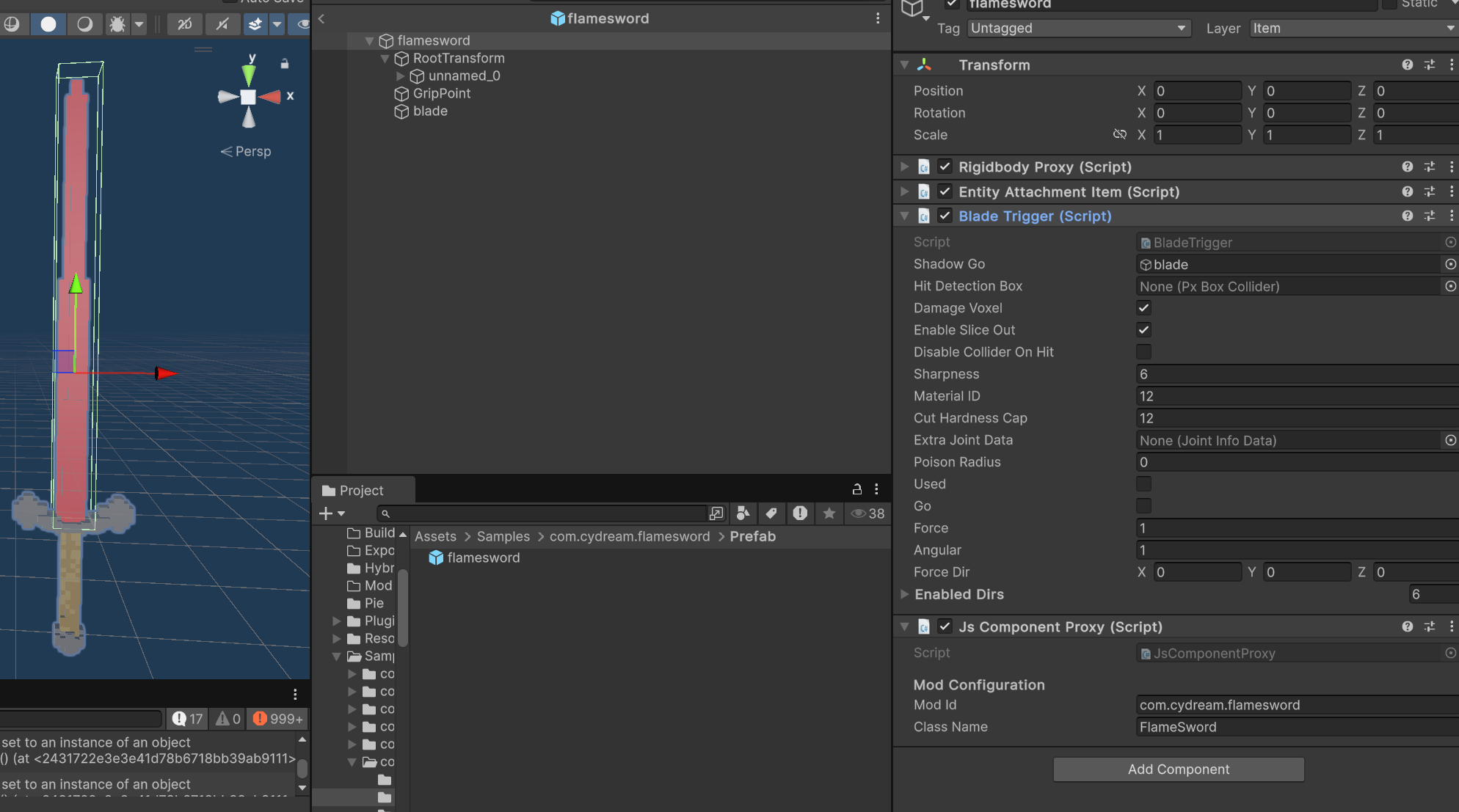
The prefab is structured like this:
- A root weapon prefab with the built-in rigidbody / attachment item setup.
- A child
RootTransformthat holds the imported voxel mesh. - A child
GripPointused for hand attachment. - A child
bladeused as the blade trigger volume.
The important part is the blade child object. It needs a BoxCollider configured as a trigger so the weapon can detect cuts along the blade volume.
Step 3: Configure the built-in weapon components
On the root weapon prefab, keep the standard engine-side item components:
Rigidbody ProxyEntity Attachment ItemBladeTrigger
BladeTrigger is what makes this behave like a melee blade. It is responsible for hit detection, slicing, and voxel damage settings for the weapon.
Typical BladeTrigger configuration in the sample:
Shadow Gopoints to thebladechild.BoxCollideronShadow Goto cover the blade exactly, is used to detect contact along the sword edge.Damage Voxelis disabled.Attach On Penetrationis enabled.Enable Slice Outis enabled.Enable Dirshas correct directions selected.
After config BoxCollider, you should see some gizmo voxel denoting shape voxels.
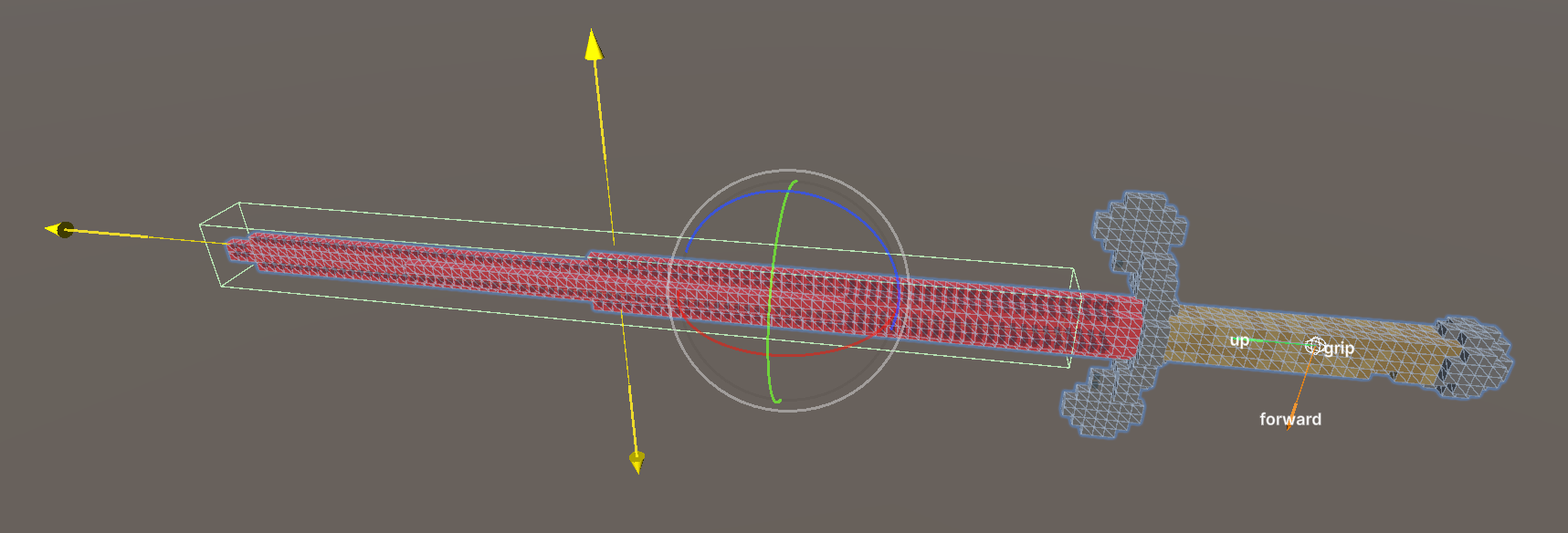
Without the blade trigger collider, the sword may appear correctly in hand but will not detect blade contact reliably.
Step 4: Add the TypeScript component
The sample does not rely on a custom C# gameplay subclass. Instead:
- Export
FlameSwordfromScripts/index.ts. - Add
JsComponentProxyto the weapon prefab. - Set Mod Id to
com.cydream.flamesword. - Set Class Name to
FlameSword.
This keeps the normal built-in melee item behavior on the prefab while layering the custom fire effect on top through TypeScript.
Step 5: Understand the script
The sample script is Assets/Samples/com.cydream.flamesword/Scripts/flamesword.ts.
Its job is simple: when the sword blade touches a destructible voxel target, it applies heat to that voxel region so the hit area catches fire.
The script flow is:
- It resolves
VX.Mod.ModAPI. - It registers
bindTo.onTriggerEnter. - On trigger enter, it checks whether the touched collider belongs to a
VoxelDestructor. - It verifies that the voxel target is destructible.
- It calls
ModAPI.ModifyVoxelProperty(...)withPointDataV2.Property.Temperature.
Representative structure:
export class FlameSword {
private readonly bindTo: VX.Mod.JsComponentProxy;
constructor(bindTo: VX.Mod.JsComponentProxy) {
this.bindTo = bindTo;
this.bindTo.onTriggerEnter = (collider) => this.onTriggerEnter(collider);
}
}
This means the physical hit detection still comes from the prefab collision setup and BladeTrigger, while the TypeScript layer adds the burning effect when a valid voxel target is touched.
Step 6: Configure the manifest
Open manifest.asset in the sample folder and add the sword prefab as an exported item.
For the sample:
Idiscom.cydream.flamesword- The item points to
Prefab/flamesword.prefab Item Typeis the melee item entry used by the sample manifest
As with the katana and wand tutorials, the important part is that the final prefab referenced by the manifest is the fully configured one with GripPoint, BladeTrigger, the blade trigger collider, and JsComponentProxy.
Step 7: Test and export
Before export, validate the sample:
npm run lint:mod -- com.cydream.flamesword
Then export the mod and test these behaviors in game:
- The weapon can be picked up and attached correctly.
- The blade collider follows the sword edge.
- Cutting contact is detected by
BladeTrigger. - Voxel targets touched by the blade start receiving heat / fire as expected.