Mod Exporter
The Mod Exporter is a tool used to package and export your created mods so they can be loaded into the game. It handles the compilation of scripts, packaging of assets (scenes, items, characters), and generation of necessary metadata.
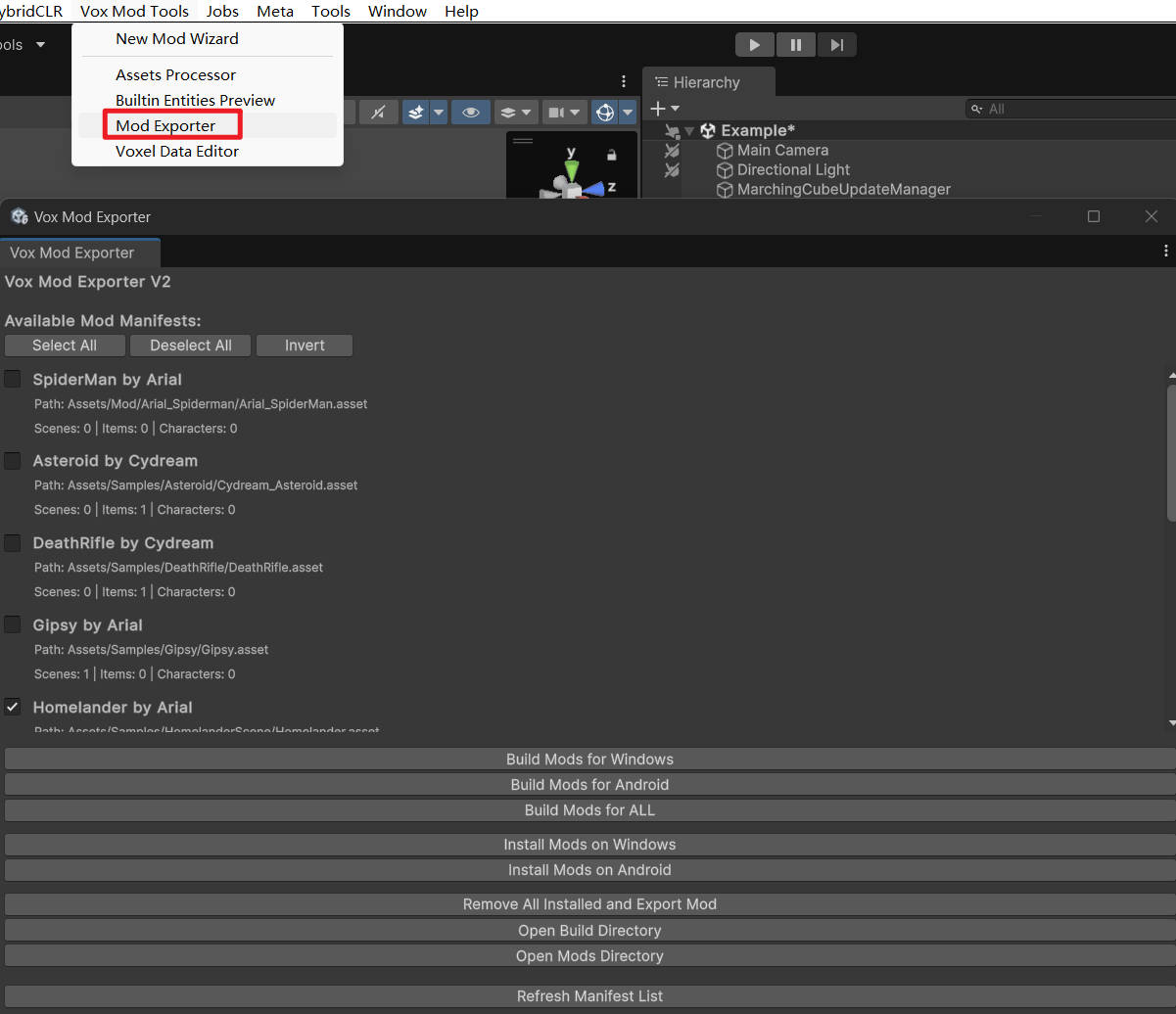
Opening the Tool
To open the Mod Exporter window, go to the top menu bar and select: Vox Mod Tools > Mod Exporter
Interface Overview
Available Mod Manifests
The main section of the window lists all ModManifest assets found in your project. Each entry displays:
- Mod Name & Creator: Defined in the manifest.
- Path: The file path to the manifest asset.
- Stats: Number of Scenes, Items, and Characters included in the mod.
Use the checkboxes next to each mod to select which ones you want to process.
Selection Controls
- Select All: Checks all available mod manifests.
- Deselect All: Unchecks all mod manifests.
- Invert: Toggles the selection state of all manifests.
Build Actions
These buttons compile the selected mods into a format the game can read (usually a .zip file containing assets and code).
- Build Mods for Windows: Builds the selected mods for the Windows platform.
- Build Mods for Android: Builds the selected mods for Android (Quest/Pico).
- Build Mods for ALL: Builds for both Windows and Android sequentially.
Install Actions
These buttons automatically copy the built mods to the game's mod directory on your machine.
- Install Mods on Windows: Installs the built Windows mods to your local game installation.
- Install Mods on Android: Installs the built Android mods (requires connected device via ADB).
Maintenance & Utilities
- Remove All Installed and Export Mod: Cleans up the build output and removes installed mods.
- Open Build Directory: Opens the folder where the raw build artifacts are generated.
- Open Mods Directory: Opens the directory where the final
.zipmod files are stored. - Refresh Manifest List: Rescans the project for
ModManifestassets. Use this if you added a new manifest and it hasn't appeared in the list yet.
Basic Workflow
- Create your mod content and ensure you have a
ModManifestset up. - Open the Mod Exporter.
- Find your mod in the list and ensure it is checked.
- Click Build Mods for Windows (or your target platform).
- Once the build is complete, click Install Mods on Windows to test it in the game immediately.